Lennox Computer LILAC Business Software
6/333 Queensport Rd North MURARRIE QLD 4172
Brisbane, Australia
http://www.lennox.com.au
Brisbane, Australia
http://www.lennox.com.au
ERP Business Accounting Software
Distribution, Manufacturing, Timber
Phone: 0418 886 912
Est. 1980

| Contact Us | Downloads | eCommerce | Demonstration Software |
Disaster Recovery
In the event of partial or total loss of LILAC server functionality it is important to rely on established procedures to mitigate and recover. This document describes Lennox Computers recommended procedures in the context of a number of scenarios presented in inceasing order of severity.
Prerequisites
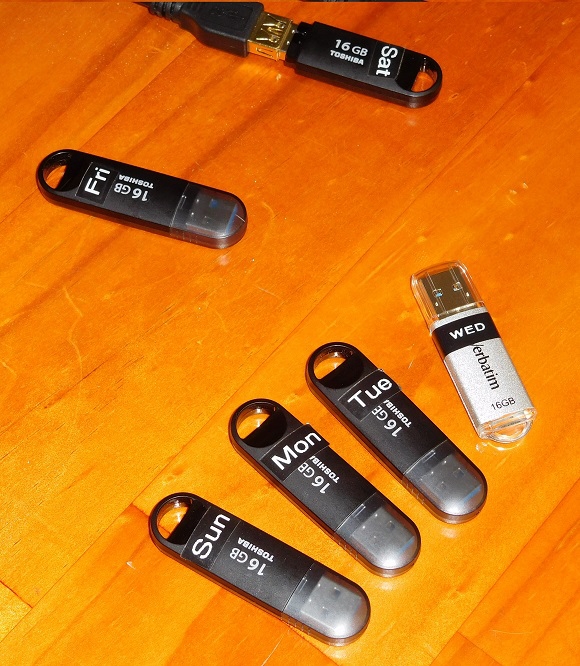
Lennox Computer recommend the use of readily available USB "flash drive" devices as removable backup media - typically 16 Gb or larger - retail around $16 each.
Purchase 7 such devices and label them as shown - one for each day of the week.
LILAC Live Backup module runs at 1:00 am each day, a staff member should install the next days USB stick in a V3.0 USB port at the end of each business day, and should the remove the current days stick from the premises.
Live Backup creates Zipped copies of the LILAC database files initially to C:\Backup in the server and then copies them to the first USB found on the server.
Purchase 7 such devices and label them as shown - one for each day of the week.
LILAC Live Backup module runs at 1:00 am each day, a staff member should install the next days USB stick in a V3.0 USB port at the end of each business day, and should the remove the current days stick from the premises.
Live Backup creates Zipped copies of the LILAC database files initially to C:\Backup in the server and then copies them to the first USB found on the server.
This discussion assumes that the server management has been properly administered according to Lennox Computers established backup protocols & utilites - specifically the routine use of the LILAC "Live Backup" module and careful managment and security practises with respect to removable backup media comprising USB interfaced disk drives.
Other Backup Strategies
In some situations additional backup strategies may be deployed - institutional complete server backup, network transfer to local or remote computers, NAS systems or "Cloud" storage. Lennox Computer cannot guarantee the effectiveness or reliability of any of these options and they must be considered secondary to the built in LILAC Live Backup procedures. All disaster recovery procedures are predicated on the existence of up-to-date USB backup copies generated by Live Backup.
Routine Backup Integrity Check
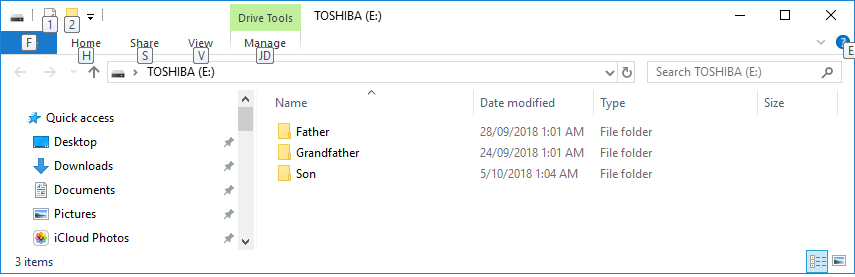
Each morning remove the USB from the server (use Windows Eject feature before unplugging device). Take this USB to a convenient workstation Window PC, and inspect the folder content on the drive.
The "Son" folder is the latest backup - check the date modified is appropriate.
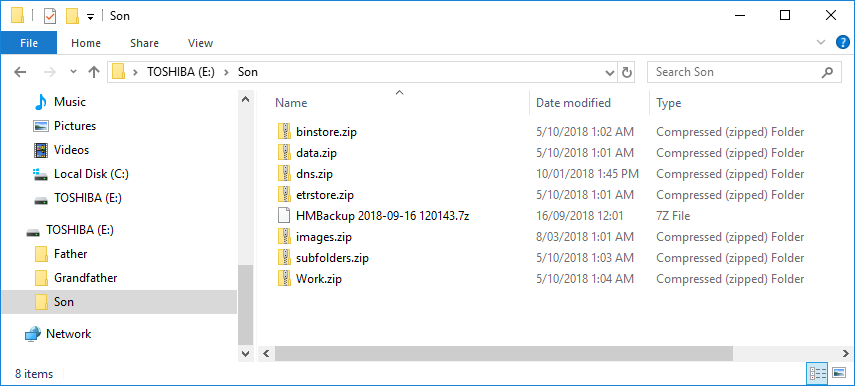
Double click on the Son folder to show the contents
The data.zip file is the main LILAC database backup. Check its date. The other zip files may be important depending on your individual circumstances - please discuss this with Lennox Computer if unsure.
The "Son" folder is the latest backup - check the date modified is appropriate.
Double click on the Son folder to show the contents
The data.zip file is the main LILAC database backup. Check its date. The other zip files may be important depending on your individual circumstances - please discuss this with Lennox Computer if unsure.